
Continuing Education (CE) Dashboard
-
How to Qualify For CE Credit:
✅ (1) Must attend live online education sessions for their whole duration to receive CE Credit (greater than 50 minutes per CE hour). Please exit out of SESSION after each CE hour is done to go back to the lobby area, then join the next session on the agenda.
-
✅ (2) CE Certificates will be emailed 24-48 hours after the event. To access your CE certificates, please login into your ODonFinance Continuing Education (CE) Dashboard with your email used to register.
-
✅ (3) The COPE Administrator of the event will automatically submit credits to ARBO (4-6 weeks) but for faster COPE course tracking, download OE TRACKER Mobile App (PAID VERSION) and scan ARBO Course QR Code directly on your mobile app after each event.
-
✅ (4) For state-specific test requirements only, please complete the PRETEST poll at the start of each event and POST-TEST via POLL/Survey at the end of the event. If you need a result certificate for your state, please email Admin@ODsonFinance.com. For State-specific requirements, please visit ARBO CE State Requirement
-
✅ (5) For each live session you attended, you must log in with your unique email and registration to get a certificate.
-
✅ (6) To get the optimal experience, you will need a high speed wifi internet (No Hot Spot) and the latest Zoom desktop client application. While you can view the event from a browser, we do not recommend it. The event will NOT be able to viewed from a ZOOM Mobile App. You can log into your EVENT LOBBY prior to make sure your ticket is active.
-
✅ (7) Join the specific CE hour SESSION to start the video stream!
-
⚠️ In accordance to COPE guidelines listed on the ARBO website, effective from January 1, 2023, any live, online lectures are classified as Synchronous Virtual sessions. This implies that attendees are required to participate in real-time and be present during the scheduled lecture time.
⚠️ PLEASE MAKE SURE your full name is correct on your ZOOM EVENT registration and to log in from that specific email, or else your CE Certificate will NOT be issued.
Frequently Asked CE Questions
You will be able to claim online interactive CE credits for the course you watch live for their full duration (at least 50 mins per 1 hour CE). If you are unable to stay for the entire of the course, you will be disqualified from receiving credit. Our system automatically tracks your event duration for each attendees.
CE Certificates will be emailed out 24-48 hours after the event. To access all your ODsonFinance Webinar CE certificates, check out the ODonFinance Continuing Education (CE) Dashboard. Please login in with your email used to register for the event.
CE Credit will NOT be available for sessions watched after the event.
Your 6-digits OE TRACKER number is used by ARBO to track your attendance at CE courses. You can find your OE Tracker number here.
Please note if you do NOT practice in North America, please fill in 000000 when you register for the event
The COPE Administrator of the event will automatically submit credits to ARBO (4-6 weeks) but for faster COPE course tracking, download OE TRACKER Mobile App (PAID VERSION) and scan ARBO Course QR Code directly on your mobile app after each lecture.
We will display the QR after the lecture and will NOT show it again due to COPE regulations. So please download the OE Tracker Mobile (paid version) prior to event
The COPE Administrator of the event will automatically submit credits to ARBO (4-6 weeks). If there is missing CE on your OE Tracker, please submit the CE certificate directly on your OE Tracker, if there is any issues contact COPE directly | https://www.arbo.org/

For faster COPE course tracking, prior to the event, download OE TRACKER mobile app and scan OE Tracker directly on your mobile app after each CE event!
You cannot edit any personal information (e.g., name, OE Tracker number) yourself on your certificates once they are submitted.
But if you need a new edited certificate for your personal records, please email admin@odsonfinance.com with your original certificate for verification.
Yup! You can view/download ALL of your certificate (s) from your ODonFinance Continuing Education (CE) Dashboard only if it is hosted by ODsonFinance. Please login in with your email used to register for the event.
All of our ODonFinance Webinar CE courses are COPE-approved. For more information, please check ARBO Course Search.
We highly encourage you to engage during the course! Post all your questions in the QA box so it can be answered either during the lecture or at the end during the QA portion of the event.
⚠️ ACCESS TO FREE RECORDING AVAILABLE TO PRIOR REGISTRANTS ONLY
For those who MISSED the event, recording is only available for viewing, just hop back to the ZOOM EVENT LOBBY, & sign in with your SPECIFIC EVENT ticket that was emailed to you. It will be under SESSIONS TAB (top) Click to "WATCH RECORDING"
Please note, this is only available for FREE up to 2 weeks post-event, then it will be fee to watch on USCREEN ON-DEMAND anytime
⚠️ You will NOT get any Credit watching lecture recordings! Must attend live the day of.
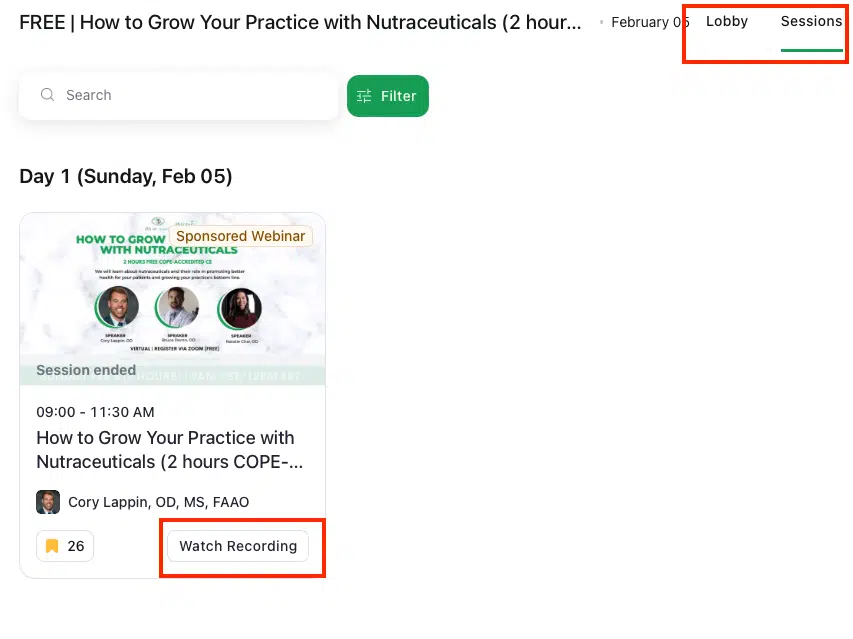
Unfortunately recording is only AVAILABLE TO PRIOR REGISTRANTS.
If there is any tickets left, you can still register up to 1 week post-event to access the recording.
But don't worry, it will be able to watch on USCREEN ON-DEMAND anytime (Fee)
It is very state-specific, some states have waived requirement for live CE and included interactive online to count toward live-in-person CE. It is largely state-dependent, so please check directly with the state board.
Also, please be aware that certain online practice management CE course will not qualify toward CE credits for certain states.
Certain states like Indiana do require a pre-test and post-test in order to count toward online interactive CE credits.
So please make sure that you answer the pre-test at the beginning of each event (via poll) and the post-test at the end of the event (via poll) but also via survey in the lobby anytime. It will also be in the 1-day f/up email.
The Post-test requires a passing grade of 75% or above. If you need a certificate of the test results for your personal record, please contact admin@odsonfinance.com
For any state-specific state requirements, please visit ARBO CE State Requirement.